Enterprise ERP Integration · Type B

NetSuite Integration
for Hykmah

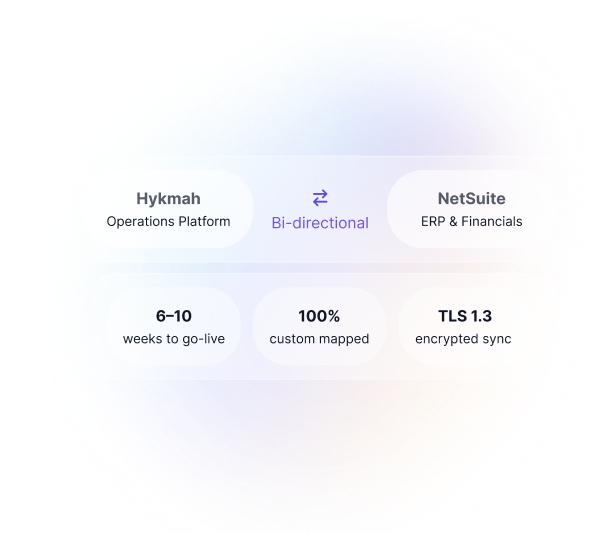
Connect Hykmah"s operations platform with NetSuite for unified financial and operational data across your enterprise. Custom SuiteScript implementation configured to your specific NetSuite deployment.

  • Bi-directional Sync
  • Enterprise-Grade
  • Custom Implementation
  • Australian Support
NetSuite Integration
Custom Implementation Required

NetSuite integration is not a self-serve connector. Every NetSuite deployment is configured differently — custom fields, subsidiaries, approval workflows, GL coding rules, and SuiteScript customisations vary significantly between organisations. Hykmah"s integration team maps your specific NetSuite schema to Hykmah"s data model during a structured implementation engagement.

Typical timeline: 6–8 weeks from discovery call to go-live for standard configurations; up to 10 weeks for complex multi-entity deployments. Implementation is quoted based on scope.

Contact our sales team
Real-World Scenarios

How Enterprises Use Hykmah + NetSuite Together

NetSuite integration serves a wide range of enterprise configurations. These scenarios illustrate the most common deployment patterns.

Scenario 1 · Wholesale Distribution

Multi-Entity Operations with Consolidated Financials

A wholesale distributor operating three legal entities runs NetSuite OneWorld as their financial consolidation platform. Each entity manages its own inventory and order fulfilment — but financial close required manual reconciliation across systems, consuming weeks each quarter.

Hykmah products (Stockwise for inventory, Orderlink for B2B ordering) replace the aging operational software at each entity. The Hykmah–NetSuite integration pushes sales orders, purchase orders, inventory movements, and customer account data to the corresponding NetSuite subsidiary in real time. NetSuite remains the financial system of record — Hykmah handles the operational layer.

Result: Each entity's operational data lands in NetSuite automatically. Consolidated P&L and inter-company eliminations run in NetSuite without manual data entry from Hykmah.

Hykmah is not a NetSuite replacement in this scenario — it is the operational layer that feeds NetSuite. The integration eliminates double-entry work, not the ERP.
Scenario 2 · Sales Pipeline Visibility

Salesforce to NetSuite Pipeline with Hykmah Operations

A services company uses Salesforce for CRM, NetSuite for financials, and Hykmah (Operon, Recuron) for service delivery and subscription management. Won deals in Salesforce trigger service contract creation in Recuron and sales order generation in NetSuite simultaneously — removing the manual handoff between sales, operations, and finance.

Revenue forecasts in NetSuite reconcile with active subscriptions in Recuron. Job costing from Operon field service work flows to NetSuite as labour and expense entries against the corresponding project record.

Hykmah acts as the operational middleware coordinating events between CRM, service delivery, and ERP. Neither Salesforce nor NetSuite is replaced — Hykmah fills the operational execution gap between them.
Scenario 3 · Legacy System Bridge

Legacy Production System to NetSuite Financial Integration

A manufacturing company has run the same production management system for 20 years. The system cannot connect directly to NetSuite, creating a daily manual export-import cycle that takes hours and introduces reconciliation errors. A full re-platform of the production system would take 18–24 months.

Hykmah's integration framework acts as a bridge — receiving operational data from the legacy system via scheduled file import, normalising it, and pushing financial-relevant records (completed works orders, inventory movements, purchase receipts) to NetSuite. The legacy system remains in place; the manual export cycle is eliminated.

Hykmah's integration framework can serve as a translation layer between legacy systems and NetSuite. This approach defers a full re-platform while immediately eliminating manual reconciliation work.
Scenario 4 · Multi-System Integration Hub

NetSuite + Salesforce + Shopify + Legacy MES — All Connected

A complex enterprise runs NetSuite (ERP), Salesforce (CRM), Shopify (B2C commerce), a legacy manufacturing execution system (MES), and Hykmah (Stockwise, Orderlink) for wholesale and inventory operations. Each system was separately integrated via point-to-point connectors — five different tools, five maintenance burdens, and a financial close process that took 15 business days each month.

Hykmah's integration layer normalises data flows between all systems. Shopify orders, Salesforce opportunities, MES completions, and Hykmah operations all route to NetSuite through a single, auditable integration. Financial close reduced from 15 days to 5 days.

Hykmah's integration framework operates within the Hykmah product ecosystem. For organisations already using a dedicated integration platform, Hykmah works alongside it rather than replacing it.
Integration Rationale

Why Integrate Hykmah with NetSuite?

NetSuite is a powerful ERP, but most enterprise operations require best-of-breed tooling beyond what any single ERP can deliver natively.

NetSuite Alone — What Gets Hard

  • Field service job management and mobile technician workflows
  • Complex subscription billing with usage-based components
  • B2B self-service ordering portals for trade customers
  • Multi-channel inventory with real-time availability
  • Operational workflows tailored to non-financial business units
  • Rapid iteration without professional services engagements

Hykmah + NetSuite — Best of Both

  • NetSuite remains the financial system of record
  • Hykmah delivers purpose-built operational products
  • Bi-directional sync keeps both systems accurate
  • No double-entry — operational events auto-post to NetSuite
  • Operational teams use Hykmah; finance teams stay in NetSuite
  • Single source of financial truth without operational compromise

Two deployment patterns are common among Hykmah + NetSuite customers:

Option 1 — Middleware for existing systems: our legacy operational systems already exist and connect to NetSuite awkwardly. Hykmah"s integration framework normalises the data flow, eliminating manual exports and reconciliation errors. The legacy systems remain; the manual work disappears.

Option 2 — Hykmah products with NetSuite sync: You deploy Hykmah products (Stockwise, Operon, Recuron, Orderlink) to replace or supplement existing operational systems, and the integration keeps NetSuite current with operational events automatically.

Most enterprise engagements use a hybrid of both — new Hykmah products for high-priority operational functions, with bridge connectors for legacy systems not yet replaced.

Data Synchronisation

What Data Syncs Between Hykmah and NetSuite?

The specific fields and objects configured depend on your implementation scope. The categories below represent standard sync coverage.

Financial Data

Invoices, credit memos, customer payments, and GL coding entries sync from Hykmah to NetSuite for financial reconciliation.

Bi-directional

Customer Accounts

Customer records, payment terms, credit limits, and account hierarchy sync between Hykmah's platform and NetSuite's customer module.

Bi-directional

Inventory & Items

Item master records, stock levels, inventory adjustments, and valuation data sync between Stockwise and NetSuite's inventory module.

Bi-directional

Sales Orders

Sales orders from Orderlink (B2B) and Sellwise flow to NetSuite as fulfilment-ready records, triggering NetSuite's revenue recognition rules.

Hykmah → NetSuite

Custom Objects

NetSuite custom record types, custom fields, and custom segments configured in your deployment are mapped during the discovery phase.

Custom

Purchase Orders

Purchase orders created in Hykmah sync to NetSuite for approval workflow and financial commitment tracking. Receipts post back automatically.

Bi-directional
Technical Architecture

How the Integration Works

Hykmah"s NetSuite integration uses SuiteScript-based connectors configured specifically for your NetSuite environment.

Integration Architecture

  • SuiteScript-Based Integration — The integration uses NetSuite"s native SuiteScript 2.x framework for all data operations, ensuring compatibility with your NetSuite version without reliance on third-party middleware.

  • Bi-Directional Sync — Changes in either Hykmah or NetSuite propagate to the other system. Conflict resolution rules (configurable per field) determine which system is authoritative when both update the same record simultaneously.

  • Field-Level Mapping — Every data field is mapped individually during discovery. Standard NetSuite fields, custom fields, and custom record types are all supported. Transformation rules handle data type conversion, currency normalisation, and code translation.

  • Conflict Resolution Engine — When the same record is modified in both systems between sync cycles, configurable rules determine which value is authoritative. Finance fields default to NetSuite; operational fields default to Hykmah.

  • Real-Time and Batch Modes — High-priority records (invoices, sales orders) sync in near real-time via webhook. High-volume data (inventory movements, usage records) sync via scheduled batch jobs to manage API rate limits.

Security & Compliance

NetSuite Token-Based Authentication (TBA) The integration uses NetSuite"s recommended TBA framework. Integration tokens are scoped to the minimum permissions required for the configured sync objects. No passwords are stored.

  • TLS 1.3 Encryption — All data in transit between Hykmah and NetSuite is encrypted using TLS 1.3. Data at rest is encrypted at the platform level.

  • Role-Based Access Control — Integration service accounts are granted only the NetSuite roles required for the configured sync scope. Permissions are reviewed during implementation and documented in your configuration record.

  • Audit Trail — Every sync operation is logged with timestamp, record ID, field changed, previous value, new value, and sync direction. Logs are retained for 12 months and exportable on request.

  • SOC 2 Type II — Hykmah"s platform operates under SOC 2 Type II controls. Integration data flows are covered by the same control framework. Certificates available under NDA.

Implementation Process

What the Integration Engagement Looks Like

A structured four-phase process from discovery to go-live. Typical timeline: 6–10 weeks depending on configuration complexity.

Phase 1.

Discovery & Scoping (Weeks 1—2)

Our integration team conducts a structured review of your NetSuite configuration, existing data model, and Hykmah products in scope. The output is a detailed integration specification: every object, field, transformation rule, and conflict resolution policy documented before any development begins.

  • NetSuite account configuration review (subsidiaries, custom fields, SuiteScript inventory)
  • Hykmah products and data objects in scope confirmed
  • Data volume and sync frequency requirements assessed
  • Integration specification document produced and signed off
  • Security and access requirements documented

Your involvement: 2–3 sessions with your NetSuite administrator and operations leads. Access to a NetSuite sandbox environment required.

Phase 2.

Configuration & Development (Weeks 3—5)

Hykmah's integration developers build the SuiteScript connectors, configure field-level mappings, implement transformation rules, and set up conflict resolution logic. All work is performed against your NetSuite sandbox and Hykmah staging environment.

  • SuiteScript connector scripts deployed to NetSuite sandbox
  • Field-level mappings configured and validated against test data
  • Transformation rules and GL coding logic implemented
  • Conflict resolution policies configured per object type
  • Sync frequency and batch job schedules configured

Your involvement: Review and sign-off on field mapping documentation. Availability for 1–2 technical clarification sessions.

Phase 3.

Testing & Validation (Weeks 6—7)

End-to-end testing against representative data volumes. Your team validates that records appear correctly in NetSuite, financials reconcile, and edge cases are handled. User acceptance testing is conducted in staging before any production deployment.

  • Unit tests for each sync object and transformation rule
  • End-to-end integration testing with representative data volumes
  • Reconciliation report validation with your finance team
  • Error handling and retry logic tested for network failure scenarios
  • User acceptance testing completed and sign-off obtained

Your involvement: Finance team availability for reconciliation validation (2–4 hours). Sign-off on UAT results required before proceeding to go-live.

Phase 4.

Go-Live & Support (Week 8+)

Production deployment is executed during a scheduled maintenance window. The Hykmah integration team monitors sync health for the first 30 days. Hypercare support is available for immediate issue resolution during stabilisation.

  • Production deployment executed in maintenance window
  • Initial full sync of historical records (scope agreed in Phase 1)
  • 30-day hypercare monitoring period with dedicated support contact
  • Runbook and operational documentation delivered
  • Handover to standard support tier after stabilisation period

Your involvement: Operations and finance teams available on go-live day. Post-launch review meetings at Day 7 and Day 30.

Frequently Asked Questions

NetSuite Integration — Common Questions

How long does NetSuite integration take?

The typical engagement runs 6–10 weeks end-to-end: 1–2 weeks discovery and scoping, 2–3 weeks configuration and development, 2 weeks testing and validation, and 1 week go-live and stabilisation. Simpler deployments (single subsidiary, standard objects, limited custom fields) can go live in 6 weeks. Multi-entity deployments with extensive customisation run closer to 10–12 weeks.

Can I integrate Hykmah with NetSuite myself?

NetSuite integration requires a custom SuiteScript implementation by Hykmah's integration team. Every NetSuite deployment is configured differently — custom fields, subsidiaries, approval workflows, GL coding rules, SuiteScript customisations — so there is no self-serve connector. Our team maps your specific NetSuite schema to Hykmah's data model during the discovery phase. This ensures the integration works correctly for your deployment rather than failing silently on custom configurations.

What Hykmah products work with NetSuite?

The following Hykmah products are supported in NetSuite integration engagements: Stockwise (inventory, purchase orders, item master), Operon (field service job costing, labour and expense to NetSuite projects), Recuron (subscription billing, deferred revenue, recurring invoices), and Orderlink (B2B sales orders, customer accounts, payment terms). Additional products can be scoped — contact our team to confirm coverage for your specific requirements.

How much does NetSuite integration cost?

The NetSuite integration connector is included in the Hykmah Enterprise subscription at no additional licence fee. Implementation is quoted separately based on complexity. Typical engagements range from $15,000 to $50,000 AUD depending on the number of Hykmah products connected, number of subsidiaries, volume of custom objects, data migration requirements, and whether legacy systems also require bridging. Contact our sales team for a tailored quote after a discovery call.

Does Hykmah support NetSuite OneWorld multi-subsidiary?

Yes. Hykmah's NetSuite integration supports OneWorld multi-subsidiary configurations. Each Hykmah entity maps to a separate NetSuite subsidiary, with consolidated financial reporting maintained in NetSuite. Inter-company transactions and eliminations remain in NetSuite; Hykmah handles the operational data for each entity. Subsidiary-level GL coding, currency, and tax treatment are all configurable per entity.

What happens when my NetSuite configuration changes?

NetSuite configuration changes that affect synced objects require an integration update, typically a small scope change. Minor changes (adding a custom field that does not touch synced objects) have no impact. As part of implementation, Hykmah documents your NetSuite configuration baseline. We recommend notifying our integration team before making significant NetSuite changes so impact can be assessed before the change goes live.

Is data secure during the integration?

Yes. All data transmitted between Hykmah and NetSuite is encrypted using TLS 1.3. The integration uses NetSuite's Token-Based Authentication (TBA) framework — no passwords are stored. Integration service accounts are scoped to minimum required permissions. Every sync operation is logged in an auditable transaction log retained for 12 months. Hykmah's platform operates under SOC 2 Type II controls covering integration data flows. Full security documentation is available under NDA for enterprise procurement reviews.

Pricing

NetSuite Integration Pricing

The integration connector is included in Hykmah Enterprise. Implementation is a professional services engagement quoted to your specific configuration.

Included in Hykmah Enterprise

The NetSuite integration capability is part of the Hykmah Enterprise subscription. There is no separate connector licence fee. Hykmah Enterprise pricing is custom-quoted based on your organisation"s scale and product requirements.

Implementation Cost

Implementation is a professional services engagement quoted after a discovery call.

Pricing depends on scope: number of Hykmah products, NetSuite subsidiaries, custom objects, data migration requirements, and legacy system bridging.

Typical range: $15,000 – $50,000 AUD

Simple single-entity deployments (1 Hykmah product, standard objects): from ~$15,000

Multi-entity with custom objects and legacy bridging: $35,000–$50,000+

Get a quote

The most accurate way to scope implementation cost is a 30-minute discovery call with our integration team. We assess your NetSuite configuration, Hykmah products required, and data complexity — then provide a written fixed-fee proposal.

Ready to Integrate Hykmah with NetSuite?

Discuss your NetSuite configuration with our integration team. We assess your setup, scope the implementation, and provide a fixed-fee proposal.


  • Step 1
    Discovery Call (30–45 min)
  • Step 2
    Technical Assessment
  • Step 3
    Custom Proposal
  • Step 4
    Implementation (6–10 weeks)